Life is busy and it is easy to forget to buy your next set of supplements in advance so that you never run out. Setting up a subscription is an easy hassle-free way to ensure you receive your supplements on a regular basis chosen by you and even gives you an extra 5% discount on top of our regular site discounts.
To create a subscription simply select the Subscribe & Save purchase option when adding a product you wish to create a subscription for to your cart. Make sure to select the delivery frequency that is suited to your needs before clicking add to cart.
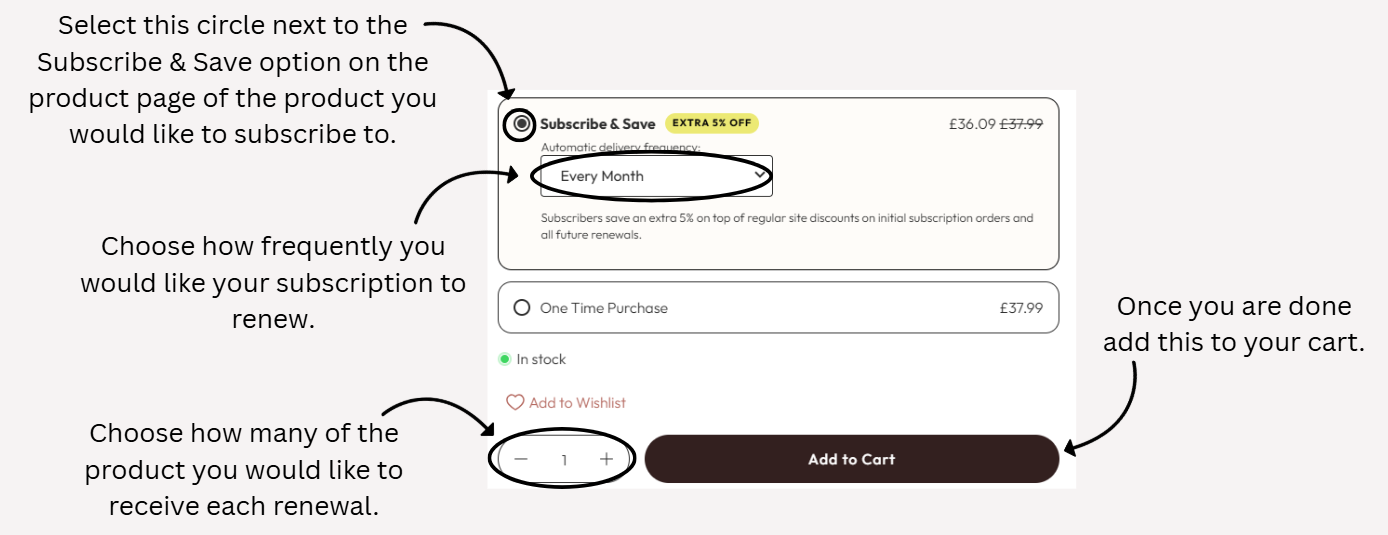
Once your order has been placed, your subscription is in place and will automatically renew at the frequency you have selected so that you no longer have to remember to order each time you need more supplements.
Was this article helpful?
That’s Great!
Thank you for your feedback
Sorry! We couldn't be helpful
Thank you for your feedback
Feedback sent
We appreciate your effort and will try to fix the article